How to turn a recipe into a Target or Safeway cart with Google Search and Gemini
The new grocery links work in AI Mode and the Gemini app, only in the US for now, and you still check out yourself.
In brief
Google's AI can now fill your Target or Safeway grocery cart in the US
In the US, Google Search's AI Mode and the Gemini app can now turn a list or recipe into a cart at Target, Albertsons, Safeway or Shaw's. You link your store account once, review the cart, and check out yourself.
If you shop at Target, Albertsons, Safeway or Shaw's in the United States, you can now ask Google to turn a recipe or a shopping list into a cart at that store. Google started rolling out the new grocery links in Search and the Gemini app on November 20, 2026, alongside tools for credit checks and tax estimates. Outside the US, none of this works yet.
Here is how to use it, and what to check before you pay.
What you need
- A US Google account, signed in. Google says the new apps are for users "in the U.S."
- An account with the store. Google says the links let you "connect loyalty accounts" and see real-time inventory. Albertsons, Safeway and Shaw's are banners of the same grocery group, so they behave alike.
- For the Gemini app on the web or an iPhone: the Keep Activity setting must be on. With it off, Google's help page says Connected Apps are not available there.
How to do it
- Open AI Mode in Google Search, or the Gemini app. Both work for the grocery stores, Google says.
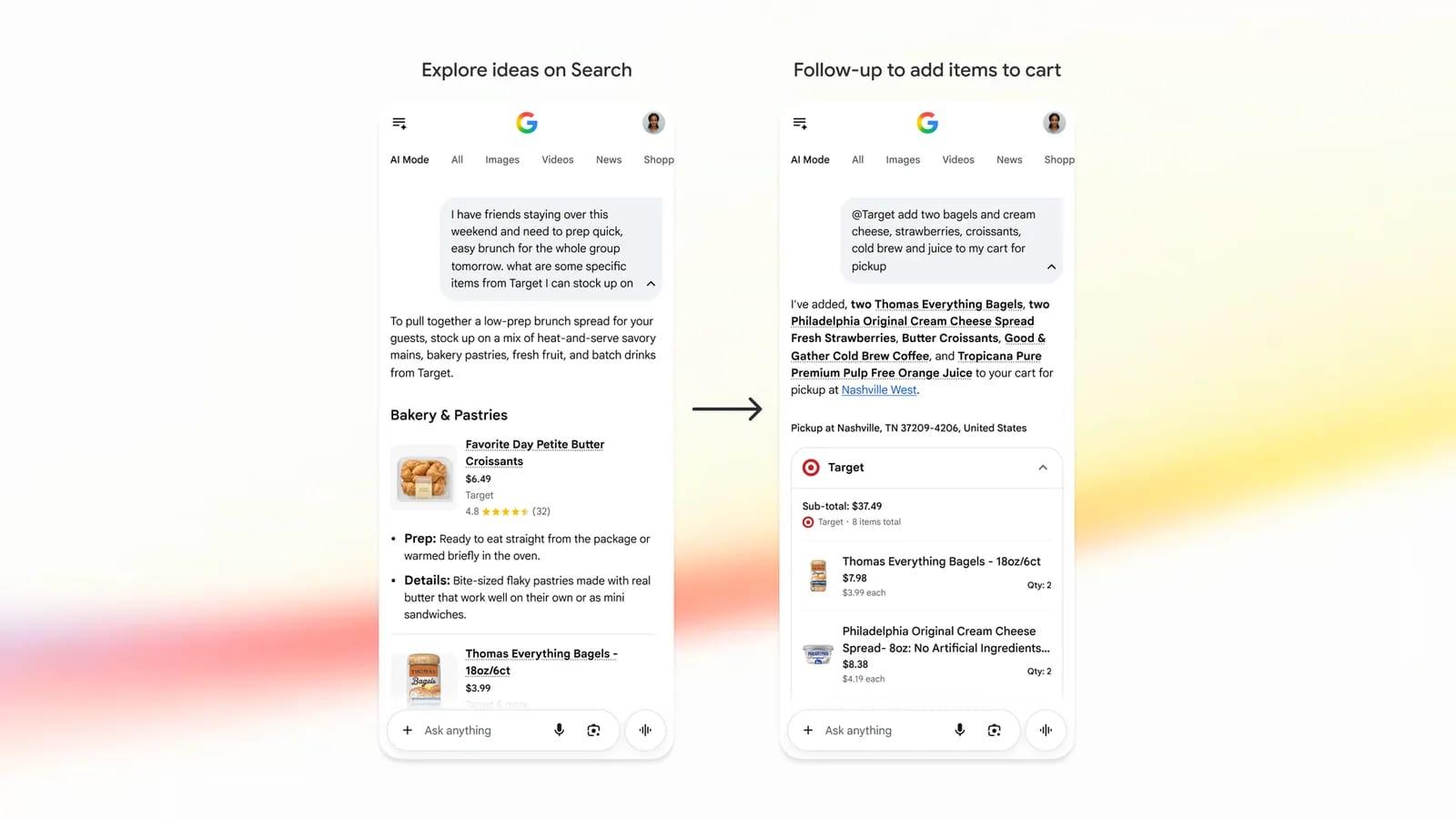
- Ask for the list. Describe the meal or paste a recipe. Google's own example asks for easy brunch items for friends staying over.
- Name the store. Type @ and pick the store. Google's demo types "@Target add two bagels and cream cheese, strawberries, croissants, cold brew and juice to my cart for pickup". Gemini's help page says that if the app is not connected yet, it will connect it or ask your permission first.
- Link your account the first time. Sign in to the store when asked. You do this once.
- Review the cart. In Google's example, the answer lists the items, the pickup store and a subtotal: $37.49 for eight items at a Target in Nashville.
- Check out. Google describes the feature as helping you "build your order and check out with ease", using what it calls the Universal Commerce Protocol, a standard for letting AI tools place orders with retailers.
What to check before you buy
- The pickup store. The cart is tied to one location. Make sure it is the one you will actually go to.
- Quantities and sizes. The AI picks a pack size and a count for you. In Google's own example it chose two packs of bagels. Check each line.
- Prices. Google's post does not say whether prices match the store's own app, or how products are picked. If price matters, compare before paying.
- What you let it buy alone. In its Gemini Tasks announcement on November 17, Google said Gemini is designed to ask before clicking "Buy", and that you can set routine steps to "Always allow". Leave that off for anything that spends money until you trust the results.
- Unlink when you are done. You can disconnect any store in Gemini's Connected Apps settings at any time.
The other new tools
The same update brings Experian, already in the Gemini app, to Search, so US users can check their credit rating and shop for a personal loan there. H&R Block in Search can calculate taxes and estimate a refund. Treat both as starting points: a loan list is not advice on which loan is right for you, and a refund estimate is not a filed return. Google also says Angi and Thumbtack, two services for hiring local repair and home help, will be linkable in Search "in the coming weeks".
Not in the US?
Then nothing changes for you yet. Google said in October that it will add "more developers, markets, and Google products over the coming months" to its Connected Apps platform, but it has given no date for any other country. AI shopping is clearly where all the big assistants are heading: on November 23, Walmart began letting Meta's Muse agent buy deals for shoppers. Until it arrives, the store's own app still does the job.
Sources
- Google: Get your year-end tasks done with new Connected Apps (November 20, 2026) (blog.google)
- News from Google on X: new Connected Apps in Search and the Gemini app (x.com)
- Gemini Apps Help: Use and manage Connected Apps in Gemini (support.google.com)
- Google: Build and manage Connected Apps in one place (October 28, 2026) (blog.google)
- Android Authority: Gemini's latest Connected Apps include Target and more (androidauthority.com)
Source: blog.google